Doctible Team
•
5
min read

Key Takeaways
SEO doesn’t have to be confusing. If you’re a chiropractor, dentist, or optometry practice trying to show up in local search results, this FAQ breaks down what matters most: what to change on your website, how to improve local visibility, and how to measure results.
SEO—or Search Engine Optimization—is how patients find you. It’s how your practice stays relevant, and it’s how you grow in a competitive digital world.
But it’s not as simple as flipping a switch. SEO involves taking the right steps to build a lasting connection with your patients online—which, let’s admit, can be confusing.
That’s why we’re breaking down all your questions about SEO, so you can get the most out of this essential tool and help your practice thrive.
SEO is how patients find your practice online using search engines like Google. But it’s more than just showing up in search results—it’s about making sure your practice stands out.
Through on-site strategies (like optimizing content and a implementing mobile-friendly design) and off-site tactics (like earning backlinks and managing online reviews), SEO builds your visibility and credibility.
It’s important because most patients don’t look beyond the first page of results.
Therefore, a strong SEO strategy increases your chances of ranking higher, helping you connect with patients before they even walk through your doors.
A well-optimized website (on-site SEO) is one of the most effective ways to drive organic traffic and reach patients searching for your services. Here are the key steps to focus on:
Focus on what patients are likely searching for—common questions, service details, and what makes your practice unique. Relevant, clear content helps search engine algorithms evaluate your site and determine its relevance to user searches.
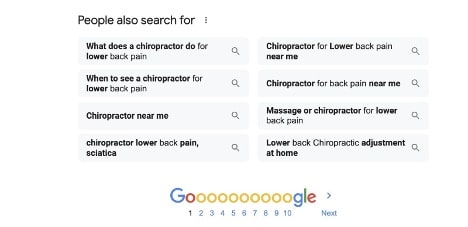
For inspiration, search Google for a term related to your practice (like “chiropractor for back pain” or “pediatric optometrist near me”). Scroll through the results, and you might find a "People also search for" section with related topics patients are curious about. These suggestions can guide you in creating content that answers real patient questions.
Keywords are phrases patients type into search engines to find services, like “pediatric dentist in [city]” or “best optometrist near me.” To begin keyword research, start by thinking like a patient: What terms would you search for if you were looking for your services?
You can also use free tools like Google’s Keyword Planner or AnswerThePublic to explore popular search terms in your area. Pay attention to phrases with high search volume and local relevance—these are the ones patients are most likely to use.
Once you’ve identified relevant keywords, include them in title tags, headings, and descriptions. This will help search engines connect your site with relevant searches. But the key here is balance: your content should still flow naturally while giving search engines the right cues.
A quick rule: one primary topic per page. Your homepage (or main location page) should focus on your core “provider + city” intent, while service pages should focus on specific services (and supporting FAQs). Avoid trying to rank one page for everything.
Example structure:
These elements act as signposts, giving both patients and search engines a quick overview of each page. Simple, descriptive titles and headings help people find what they’re looking for quickly.
64% of web traffic comes from mobile devices. Your site needs to load quickly and display properly on smaller screens to keep patients from clicking away. What’s more, Google’s mobile-first indexing prioritizes the mobile version of your site when determining rankings. That means a slow or clunky experience can hurt your visibility.
To stay competitive, ensure your pages are easy to navigate and work seamlessly—especially on phones and tablets.
Internal links—like connecting your “Services” page to your “Contact” page—help guide visitors to key information. Importantly, they also make your site easier for search engines to navigate.
Structured data, also called schema, is a way to give search engines extra details about your practice. For example, it can highlight your business hours, location, or patient reviews directly in search results. Additional info can help your patients find what they need faster and make your listing stand out when they’re comparing options.
With these updates, your website will do a better job of showing up in search results and guiding patients to your door.
Your website is just the start. To truly stand out, you’ll want to expand your online presence beyond your homepage. Here are some effective steps to improve your practice’s off-site SEO:
Your Google Business Profile is one of the biggest drivers of local visibility because it influences how you show up in Google Search and Google Maps. Make sure your profile is complete (services, hours, photos), and keep your Name, Address, and Phone (NAP) consistent everywhere online.
After that, confirm your listings on major platforms patients actually use (like Yelp and Apple Maps) and fix duplicates or outdated info.

Nearly 75% of patients read online reviews as their first step in finding a new doctor, making them one of the most important tools for attracting new patients. And positive reviews don’t just build trust—they can also boost your practice’s visibility in local searches.
Simplify the process by sending patients a direct review link after their appointment or including a friendly reminder in follow-up messages.
An active presence on platforms like Facebook or Instagram allows you to connect with patients, share updates, and increase your visibility. Social media engagement can drive more traffic to your website.
Collaborate with local businesses or contribute to community blog posts as part of your link building strategy. High-quality backlinks signal to search engines that your content is valuable, boosting your rankings.
Most visitors decide within the first 20 seconds whether to stay on a site or leave. To make those seconds count, focus on what patients look for first:
When your website is clear, responsive, and easy to navigate, patients feel confident taking the next step

SEO isn’t a “set it and forget it” tool, it’s an ongoing process that requires tracking and adjustments. Analytics tools, like Google Analytics and Google Search Console, can give you a clear picture of your website's performance.
Keep an eye on key metrics, such as:
Regularly reviewing these metrics helps you spot what’s working and where adjustments might be needed.
If you’re getting traffic but not getting inquiries, it often means the page isn’t matching what patients expected, or the next step isn’t obvious. Improve the headline, clarify services, and make your CTA (Call / Book / Request Appointment) unavoidable.
SEO is one of the most effective ways to grow your practice and connect with patients online. It helps you reach your target audience, improve your website’s performance, and strengthen your overall digital presence.
But keeping up with SEO requires consistent attention. For most practices, that responsibility competes with patient care and daily operations.
Doctible supports every step from search to scheduled appointment:
When your search visibility and patient engagement work together, you can turn local demand into a schedule that stays full.
Book a demo to see how Doctible can help you rank locally, respond faster, and fill your schedule.

Decker, A. (2024, April 4). The Fundamentals of On-Page SEO [+How-To Checklists and Templates]. HubSpot. https://blog.hubspot.com/blog/tabid/6307/bid/33655/a-step-by-step-guide-to-flawless-on-page-seo-free-template.aspx
Duarte, F. (2025, July 10). Internet Traffic from Mobile Devices (July 2025). Exploding Topics. https://explodingtopics.com/blog/mobile-internet-traffic
Introduction to Structured Data Markup in Google Search. (2025, December 10). Google Search Central. https://developers.google.com/search/docs/appearance/structured-data/intro-structured-data
Shryock, T. (2023, January 19). Do Online Ratings Help Patients Find Better Doctors? Medical Economics. https://www.medicaleconomics.com/view/do-online-ratings-help-patients-find-better-doctors-

If you want the best digital patient engagement and marketing platform, you need Doctible.

.png)